Facebook brings in some much needed features to its Advertising platform but do they do enough to make its product suitable for mass market SMEs?
 The good news was sent out via Facebook’s Ad newsletter that finally some of the features advertisers take for granted on other platforms such as Microsoft adCentre or Google AdWords are slowly being rolled out on Facebook Ads. The first is allowing multiple users to access your Facebook ads account via the permission tool you can give the ability for others to manage your account on your behalf. The general user can accomplish tasks such as improving quality of campaigns and performance of your ads or just monitoring the results of your ad campaign via the reports only setting. The add user setting is fairly easy to find but still requires a little digging to find, shown below.
- Go to your Settings page of your Ads Manager
- Click the “Add User” button
- Enter the name or email address of the person you want to add
- Choose the user access level. “General User” will allow full control, whereas “Reports Only” will allow for monitoring results but not editing campaigns.
- Done
The benefits to advertisers is they can now provide access without the user having access to your personal account, profile details, messages, or notifications. The new user system actually has 3 access level for users now with the original account owner being the admin.

- Admin User – The admin is the only person that can provide new users with access to their account and only one administrator can be attached to an account. They can do everything including add and remove credit cards and export ad reports.
- General User – The general user can create, edit and delete ads and any past or present campaign, access all reports but only view and cannot change billing details.
- Reports Only User – The base level user is the reports only user who can only access campaign and ad reports.
Facebook User Limitations
Facebook only allows you to provide access permissions to existing Facebook users, which you can search for by name if you are friends with them already or enter their email address associated with their Facebook account. Facebook has followed Google’s lead in forcing members to create a Google account before it will allow access which means an increased number of accounts created that will boost overall member numbers.
One key factor that shows only a limited number businesses are advertising with Facebook, they have limited user access to up to 25 different ad accounts. The only issue is as shown below you can only create additional users one at a time, but it looks like it there is room for more users but has been disabled for some reason. These limitations seem to show their Ad system is not yet scalable for Reseller models that target SMEs allowing Google AdWords to continue its domination of that market.

Facebook offers easier ad creation
To speed up the process and bring their platform closer to the mass market the have released a suggested ad tool. So if you’re looking for some inspiration when creating your new Facebook Ads, try their “Suggest an Ad”, which they refer to as one-click ad creation.
- Go to your Ads Manager
- Click on “Create an Ad”
- Enter the URL of the website you want the ad to link to in the “Destination URL” field
- Click on “Suggest an Ad”
- Wait
- Confirm
As shown in the image below, you can use the copy as I have from the existing advert or enter the new destination URL and click suggest an Ad button and build a whole new fresh ad.

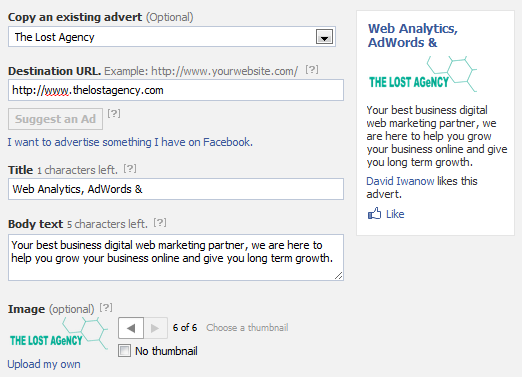
As shown in the example below, the new Facebook ad system should automatically suggest an ad title, body and image based on the Destination URL. From this step, you can further modify the creative title, body text or image found, or chose to move on to the step that allows you to target your ad.

This is a feature that should have been included much earlier but its great to see that it is now available and does a much better job of finding suitable images and streamlines the process for quick campaigns or when using unique campaign specific landing pages.